1.0.1 - release

1.0.1 - release
KisimScheduling - Local Development build (v1.0.1). See the Directory of published versions
| Official URL: http://fhir.kisimdocs.ch/ig/KisimScheduling/ImplementationGuide/hl7.fhir.ch.kisimscheduling | Version: 1.0.1 | |||
| Active as of 2023-11-22 | Computable Name: KisimScheduling | |||
The following Implementation Guide (IG) describes the interaction with the Cistec AG scheduling services.
The implementation is split into different use cases as described below. Additionally, to the basic use cases there are some operations which can be used to support the scheduling process, such as search for already created appointments and check for schedules and the offered service categories.
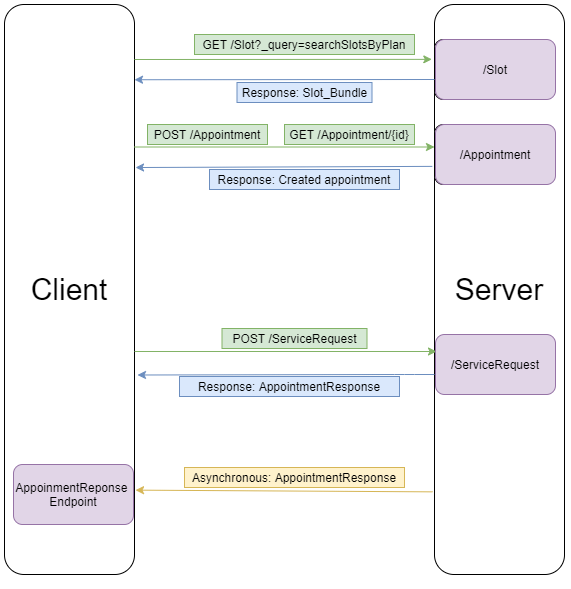
Due to the specific situation in a hospital, the appointment booking process can be quite complex. Resources (Practitioners, Locations) inside a hospital are scarce and expensive, therefore the capacity utilization has to be as high as possible. The implementation described here uses already existing resources inside the hospital and publishes a subset of those resources on a FHIR-Interface. As a consequence there are some constraints concerning the time to live of a Slot resource or the acceptance of an appointment inside the system.
Unfortunately it is not possible for a Patient or a Practitioner to simply book an appointment in a hospital and for the patient to then show up on the booked time. For that reason the appointment booking and the appointment confirmation are asynchronous. This means that after an appointment booking, the hospital has to verify the booked appointment, clear the patient, create an encounter and might execute some additional administrative steps.
To address this problem, an appointment booking simply sends the client a confirmation after a successful booking. Inside the hospital, there are processes in place to handle such a temporary appointment. After the hospital has run through the necessary steps, the appointment is either accepted or declined. At that point, the client receives an appointment response with a status if the appointment is accepted or declined.
Alternatively the client might not want to implement an endpoint for the appointment response. In such a case it is possible for the client to poll his created appointments and check if the appointment is accepted or rejected. To that avail the client of course needs to maintain a list of his created appointments.
If an appointment was booked or created in KISIM, there might be a need for the client system to reschedule such an appointment. This is an additional usecase.
The following resources are supported/needed for this IG:
| Name | Description |
|---|---|
| CISTEC | The publisher of this IG |
| KISIM | The clinical information system from CISTEC. Also used when referenced to the server |
| Client or client system | The implementer of this IG |
| Plan | A search plan defined in KISIM. This plan contains the locations to search for free slots and some additional info such as duration of a default appointment. The plan is not accessible in fhir as of yet |
| User/USER | A Practitioner, the identifier of a practitioner inside KISIM (USER) |
| Room/KONS | A Location, the identifier of a Room/Location inside KISIM (KONS) |
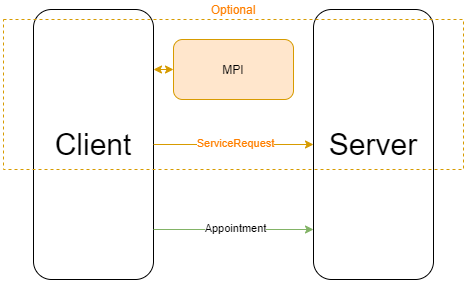
There are different use cases which are described by this IG.
UseCase 1: Scheduling when the client does not know the servers internal patient identifier
In this case the client does not know anything about server internal patient records. This might be the case in an online booking application from an external website.
This use case is described hereUseCase 2: Scheduling when the client knows the patient identifier
In this case the client knows the internal patient identifier. This might be the case in a portal application or an application which can do a patient clearing in a different way.
This use case is described hereUseCase 3: Reschedule an existing appointment
In this case there already was a successful booking and the booked appointment should be rescheduled
This use case is described hereUseCase 4: Reschedule KISIM appointment
In this case the client system received an appointment id from KISIM and the client application wants to reschedule that appointment
This use case is described hereThe workflow for the use cases is nearly the same, step 3 is not required for UseCase 2 and 3.
It is highly encouraged for the client system to expose an AppointmentResponse-Endpoint. The response containing the booking state (accepted, declined) for a specific appointment will be sent there asynchronously.